
Leadership work that doesn’t reset.
Fingertip keeps decisions, follow-ups, ownership, files and email requests connected over time inside Microsoft Teams, so leaders do not rebuild context after every meeting.
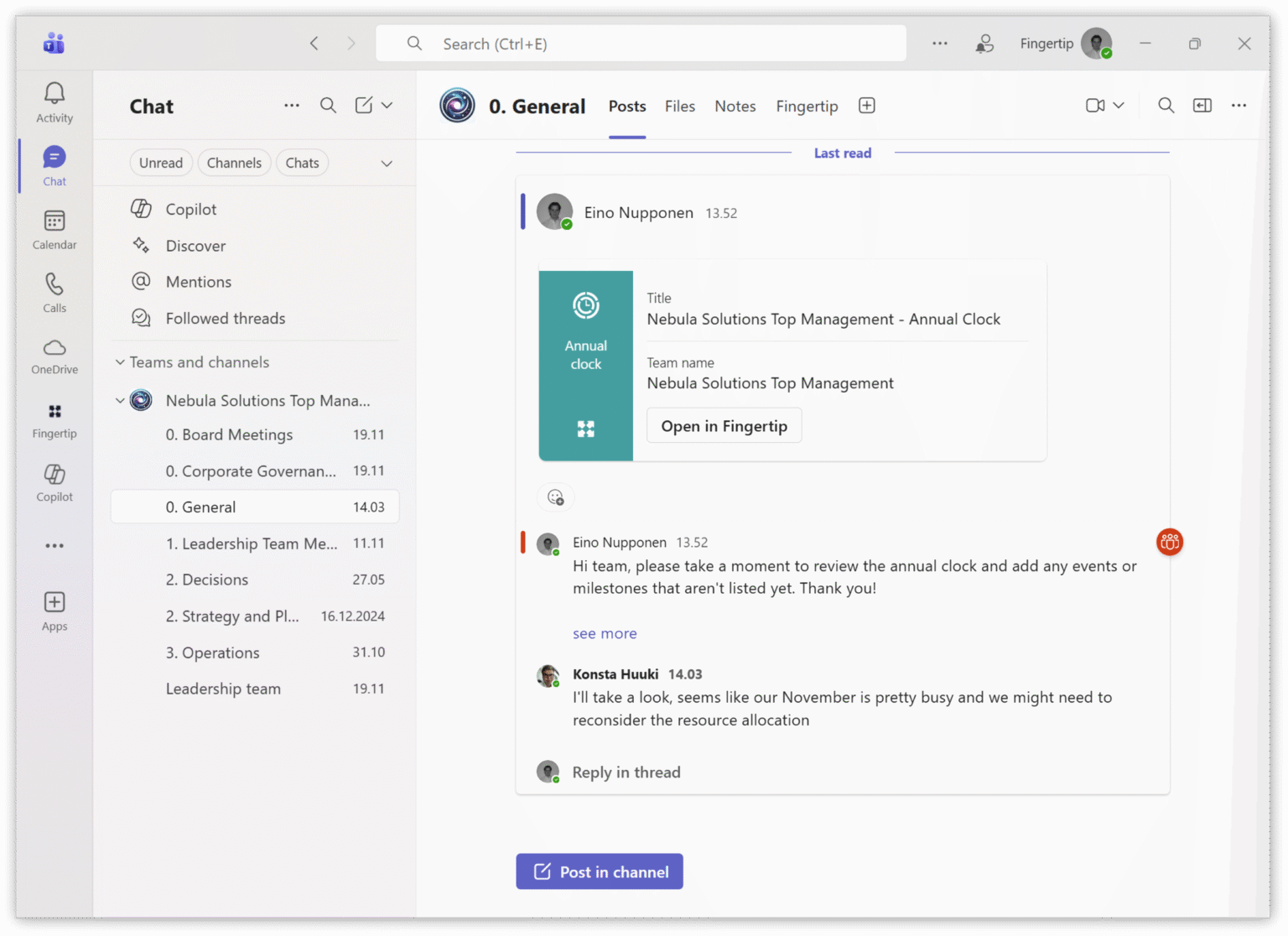
Work happens. Context disappears.
Leadership work spreads across meetings, email, chat and documents. Each tool works, but ownership and context do not carry forward reliably. Leaders compensate by remembering, chasing and repeating discussions.
We start from zero again.
After a meeting ends, decisions and follow-ups often dissolve into chat, notes or memory. The next meeting begins with repeated discussion because the previous context was not held.
See how meetings carry forwardWho owns this now?
When work is tracked across email, chat and separate task lists, accountability blurs. Leaders lose confidence that decisions will translate into execution. See how ownership stays explicitI have to chase this again.
Important requests arrive by email and become informal tasks. Progress stays hidden in personal inboxes and threads instead of becoming shared leadership work. See how email becomes owned workWhy are we back here?
Files and links are shared, but their meaning fades. Decisions lose rationale. Leaders rebuild history manually instead of using an organizational record. See how context stays attachedHold leadership work together inside Teams.
Fingertip gives leadership work a durable structure inside Microsoft Teams. Meetings, decisions, tasks and objectives become explicit objects with clear ownership and relationships. Outlook meetings and email become structured entry points, and files and links stay attached to the work they support.
Watch a demoA leadership system of record in Microsoft Teams.
Fingertip keeps leadership work visible and reviewable by connecting meetings, decisions, follow-ups and supporting material as one system inside Teams.
Leadership objects that persist
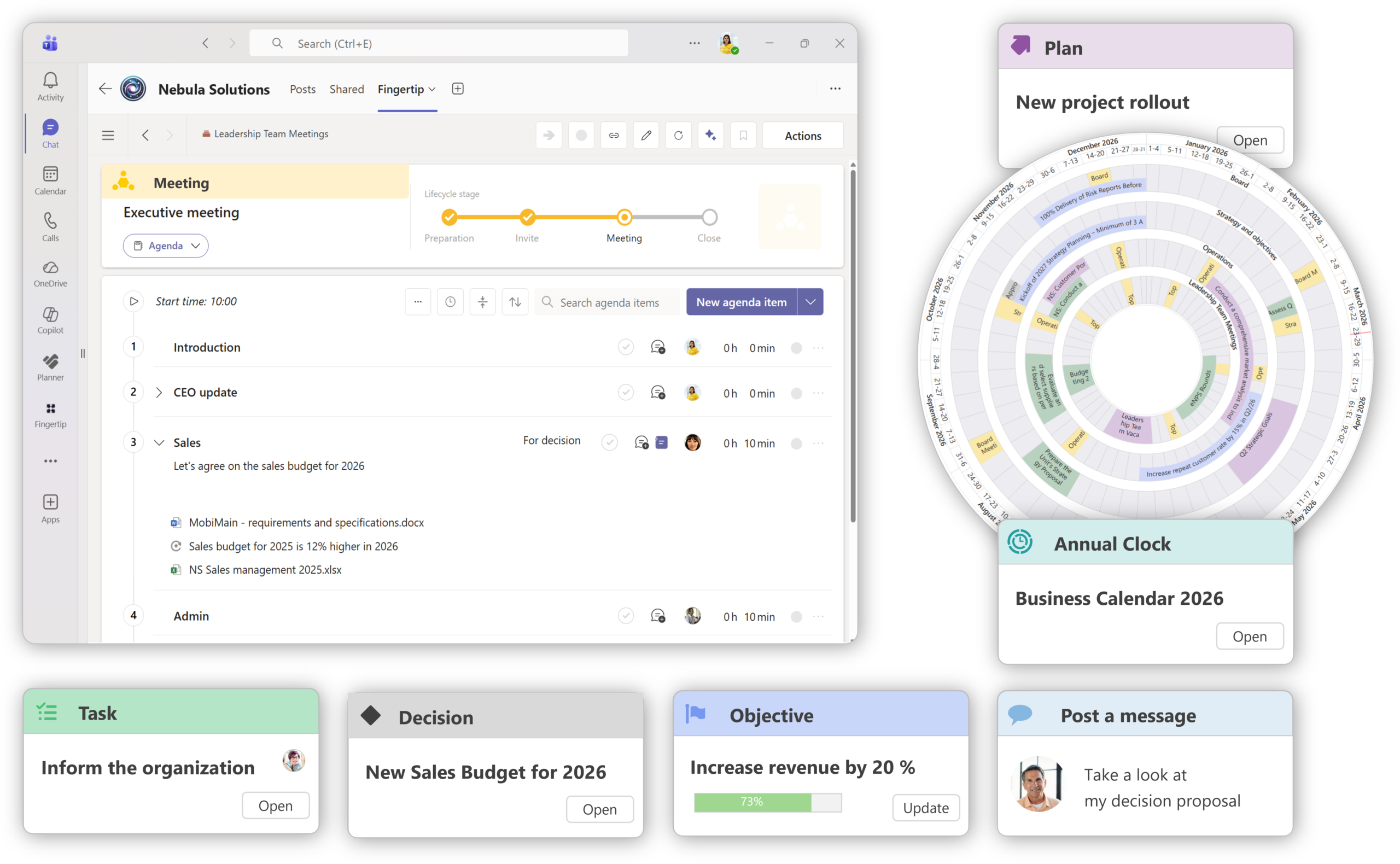
Meetings, decisions, tasks, plans and objectives remain durable entities with explicit relationships, so leadership work does not dissolve into chat and memory.
Meetings stay inside Teams
Fingertip makes Microsoft Teams the place where leadership meetings, agendas, outcomes and follow-up continue after the calendar event ends.
Explore Teams-native meetings
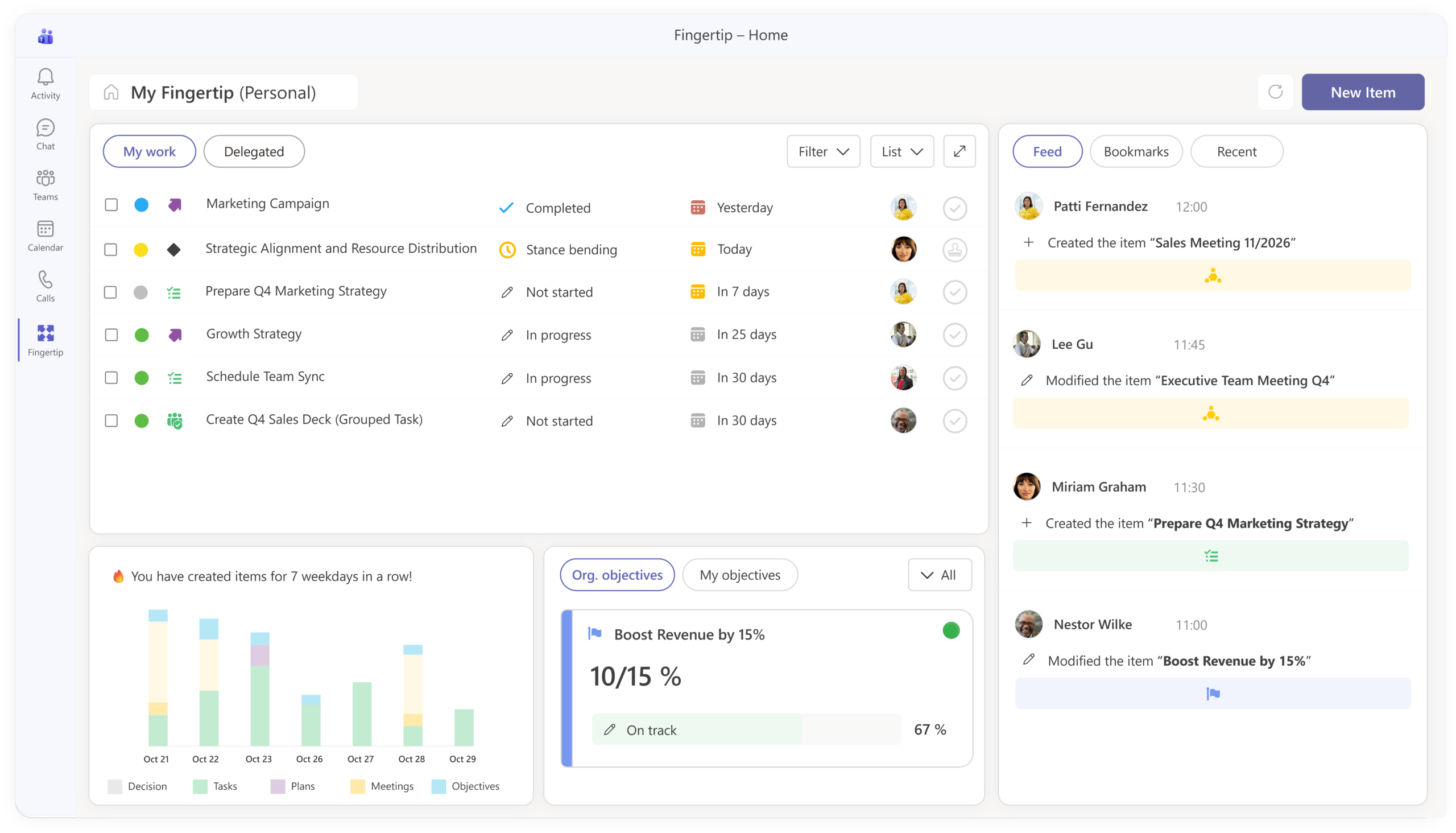
Everyone gets a clear leadership home
Inside Teams, My Fingertip gives each person one view of open responsibilities across tasks, decisions, meetings, approvals, objectives and plans.
See My Fingertip
Built into the places leaders already work.
Fingertip does not ask leadership work to move into a separate world. It uses Microsoft Teams as the home, Outlook as a natural entry point and SharePoint as the file record.
Work belongs to its context
Leadership objects live where the team works, so visibility follows the actual organization.
Calendar and email become entry points
Meetings and important requests can turn into persistent leadership work with ownership.
Files stay where they belong
Fingertip captures relevance and relationships without becoming another file repository.
See Fingertip in action
Explore how leadership work stays coherent across time, change, and delegation inside Microsoft Teams.
Leadership continuity becomes part of the operating model.
The strongest customer proof is about durable change: strategy, daily leadership and follow-through start to live in one shared system.
“Fingertip has been a key tool to combine our strategy process and our daily management into one system.”
Head of strategy
Logistics company
“Fingertip made the change stick to our model of work.”
Head of strategy
Manufacturing company
“Meeting practices improved, and decisions were systematically documented.”
Deputy-CEO
Manufacturing company
Communication tools need a leadership layer.
Teams, Outlook and SharePoint are good at communication and content. Fingertip adds structure that keeps outcomes, ownership and follow-up connected over time.
Built for leaders who carry cross-team responsibility.
Fingertip is most useful when responsibility spans people and time, and leadership work must remain coherent beyond one meeting or one inbox thread.
Direction that holds through execution
Keep decisions and follow-ups visible across teams without relying on memory and repeated status requests.
Cross-team ownership without chasing
Maintain accountability, context and continuity across recurring forums and initiatives inside Teams.
Shared context that carries forward
Reduce repeated debate by keeping decisions, tasks and evidence connected between meetings.
Traceability without extra reporting
Improve reviewability because leadership objects retain history, relationships and outcomes by design.
See leadership continuity in Teams.
If your leadership work runs in Microsoft Teams, Fingertip can help you keep decisions, follow-ups and ownership connected over time so work carries forward instead of resetting.

Milla Nevanlinna
Partner, Sales
What leaders ask before choosing Fingertip for Microsoft Teams.
Straight answers about how Fingertip works with Teams, Outlook and SharePoint to keep leadership work connected.
Does Fingertip replace Microsoft Teams?
No. Fingertip works inside Microsoft Teams and adds structure for leadership work. Teams remains the collaboration environment, while Fingertip keeps decisions, follow-ups and ownership connected over time.
Do we need to move files into Fingertip?
No. Files remain in SharePoint. Fingertip attaches files and links to meetings, decisions and follow-ups so supporting material stays visible where it matters.
How does Fingertip relate to Outlook meetings?
Outlook meetings can be mirrored into Fingertip as persistent meeting objects with agendas, outcomes, follow-up and relationships. This helps recurring meetings carry context forward.
What happens to email requests?
Important emails can be converted into Fingertip objects such as tasks, decisions, plans or objectives. The source context is preserved and ownership becomes explicit.
Is Fingertip a project management tool?
Fingertip is leadership infrastructure, not a generic project management replacement. It helps leaders keep meetings, decisions, ownership and follow-up connected inside Microsoft Teams.
Who benefits most from Fingertip?
Senior leaders, functional leaders, leadership teams and operations roles benefit most when they coordinate work across people, meetings and time horizons.
What kind of memory does Fingertip provide?
Fingertip preserves leadership objects, history, relationships and supporting material. Leaders can review what was decided, who owns what and what happens next without rebuilding the story manually.
Do we need to change how we work?
Fingertip fits into Microsoft Teams, Outlook and SharePoint, but it also supports better leadership habits: prepared agendas, explicit ownership, connected follow-up and regular review.