My Fingertip

Know what needs attention.

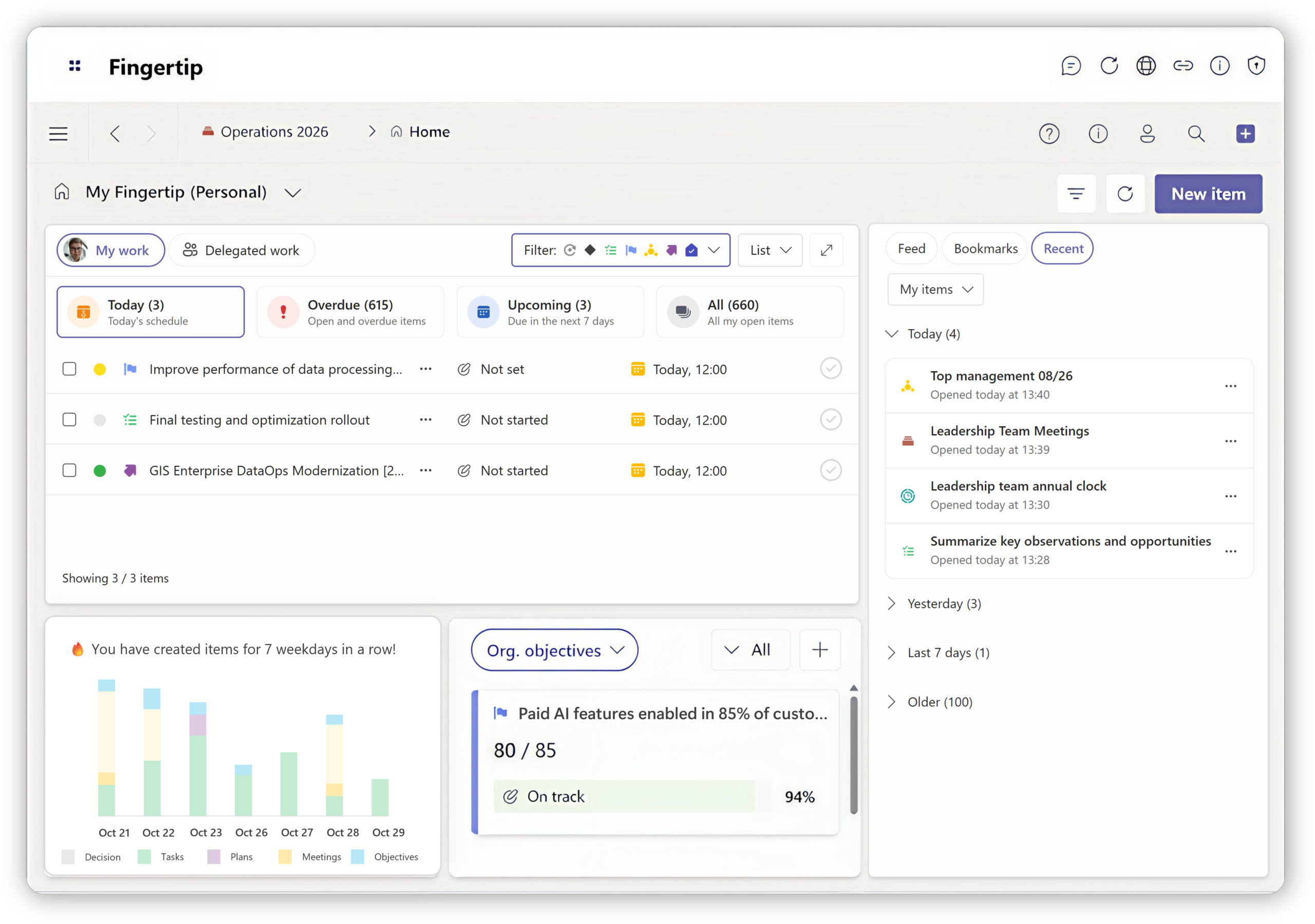
My Fingertip brings all incomplete personal and delegated commitments into one clear home view inside Microsoft Teams, so leaders can see what matters without scanning meetings, chats and lists.

Personal and delegated visibilityTime-based planning views
My Fingertip

Know what needs attention.

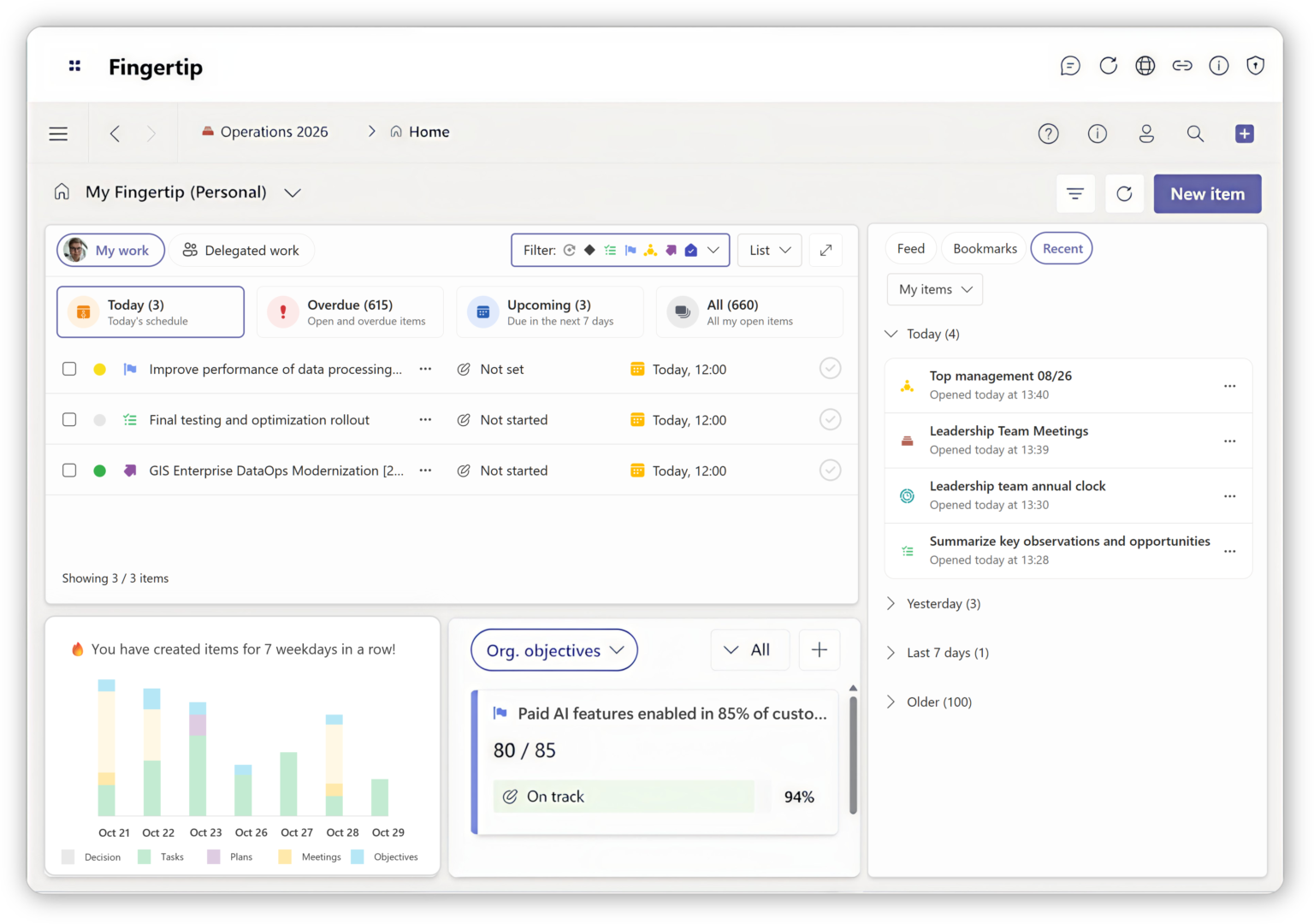
My Fingertip brings all incomplete personal and delegated commitments into one clear home view inside Microsoft Teams, so leaders can see what matters without scanning meetings, chats and lists.

Personal and delegated visibilityTime-based planning views
Personal leadership homeOne starting point for work that still requires attention.
Delegation stays visibleAssigned work remains in view until it is resolved.
Time in the pictureOverdue, today, upcoming, calendar, month and Gantt views.
Current reality

Leadership attention is scattered.

Most leaders are not missing information. They are missing orientation. Commitments live across meetings, chats, calendars and memory, making it hard to know what still requires attention until problems surface late.

Delegation
🧭

Delegated work disappears

After delegation, commitments often fall out of sight. Leaders only notice delays when someone escalates or deadlines are missed.

See how delegated work stays visible
Follow-up
🔎

Too much status checking

Leaders spend time asking for updates because there is no reliable view of progress. Follow-up replaces leadership. Reduce manual follow-up
Focus
🎯

No clear daily priorities

Important work competes with urgent interruptions. Without a clear view of what needs attention today, leadership becomes reactive. Start the day oriented
Planning
📅

Overload appears too late

Conflicting commitments and unrealistic plans surface only when deadlines collide. By then, options are limited. See workload earlier

Leadership needs a reliable home.

Leaders need one place that shows what is still incomplete and personally relevant. My Fingertip provides that missing orientation by surfacing responsibility and time in one calm, consistent view inside Microsoft Teams.

Separated responsibility: personal and delegated work are easy to distinguish.
Time is visible: leaders can see what is overdue, current and upcoming.

Watch a demo

Leadership attention system

One surface, three kinds of clarity.

The value is not another list. It is the combination of responsibility, delegation and time in the same leadership surface.

Responsibility

What needs my action?

Incomplete personal work stays visible without mixing with completed history.

Delegation

What am I accountable for through others?

Delegated work remains in view until it is resolved.

Time

What is realistic now?

Calendar and Gantt views make overload visible before deadlines collide.

Product proof

How My Fingertip works.

A personal leadership surface that reflects reality as it is now: incomplete responsibility, delegated work and time in one place.

One view of responsibility

My Fingertip aggregates all incomplete work where you have responsibility, across tasks, decisions, meetings, approvals, objectives and plans.

ScopeAll Fingertip objects aggregated into one personal view.
StatusIncomplete work is shown by default, so attention stays on unresolved commitments.
ContextItems remain linked to their original meeting, decision, plan or objective.

Delegated work becomes personal clarity

My Fingertip shows open delegated responsibilities in one place, so people can act on what they own without searching through meetings, chats or emails.

See how delegation works

Personal work stays in Teams

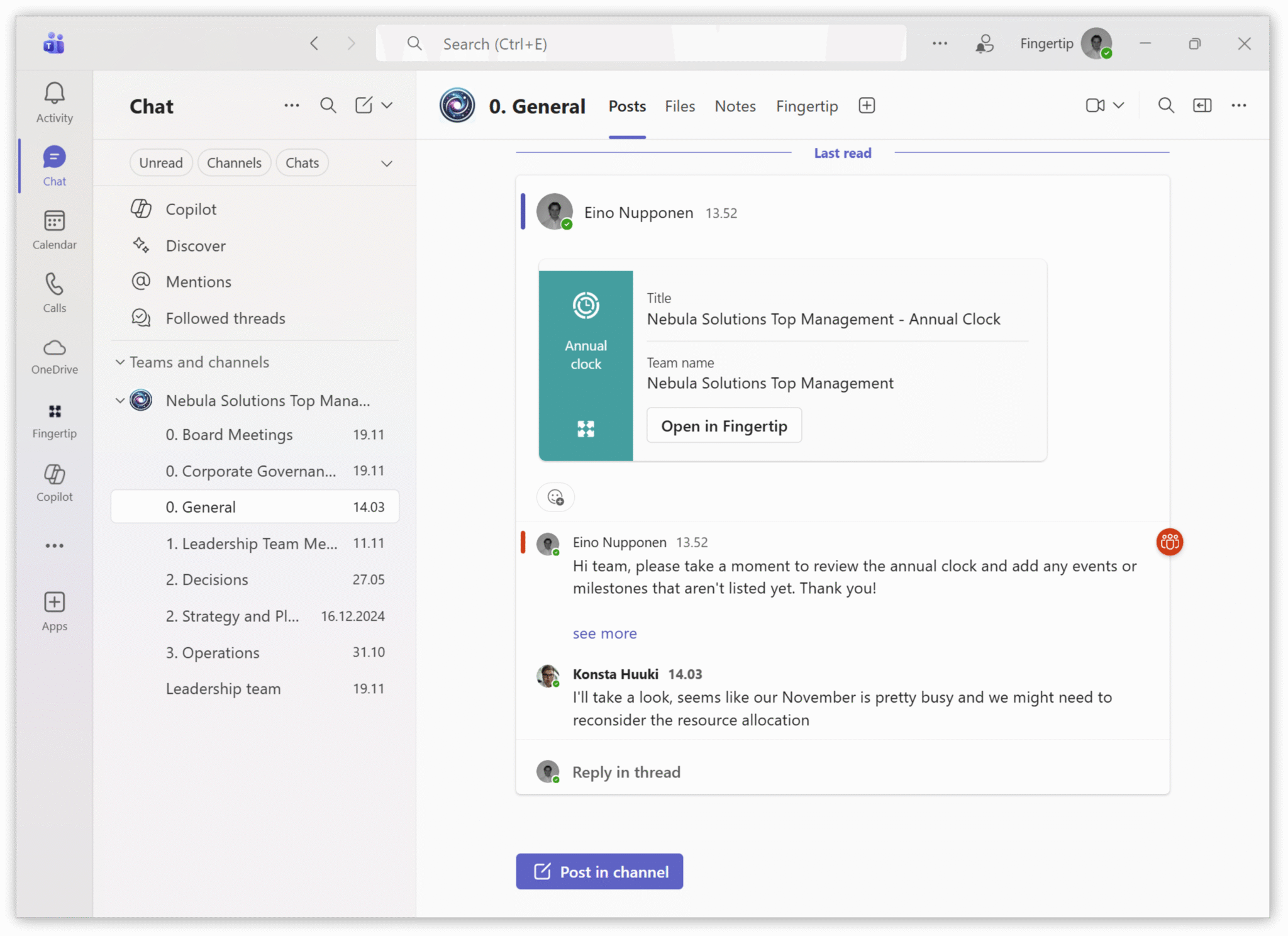
Fingertip keeps responsibilities, context and follow-up inside the Microsoft environment where people already work, instead of creating another destination.

See how it integrates to Teams
See My Fingertip in action

Explore how a personal leadership home helps leaders start the day oriented and end it with confidence.
Watch overview
Customer proof

Leaders need calm visibility before work fails.

The strongest proof for My Fingertip is simple: fewer blind spots, less chasing and a clearer view of responsibility.

“Now we see the situation at a glance. It has brought real peace of mind to leadership.”

Leadership team member
Expert organization

“Important commitments no longer disappear between meetings.”

Senior leader
Industrial services

“The clearer the responsibility signal, the easier it is to lead without constant checking.”

Operations director
Public sector

Why current tools fall short

Most tools support activity. Few support orientation.

My Fingertip gives leaders one personal surface for incomplete responsibility across contexts, instead of another place to manually reconstruct the day.

Teams chatFast for discussion, but commitments vanish into conversation history.
With My FingertipCommitments stay visible as incomplete work until they are resolved.
Task listsUseful locally, but fragmented and often missing leadership context.
With My FingertipTasks, decisions, meetings and plans are aggregated by responsibility.
Status meetingsRestore visibility temporarily, but are reactive and time-consuming.
With My FingertipVisibility is continuous, personal and connected to daily work.
Who it helps

For people who carry responsibility across others and contexts.

My Fingertip is most valuable when leadership depends on seeing incomplete work before it quietly turns into risk.

Executive leader

Accountability at scale

Keep strategic commitments visible across teams without reconstructing status from meetings and memory.

Manager

Lead without chasing

See what needs follow-up before it escalates, and separate own work from delegated responsibility.

Contributor

Clear expectations

Understand priorities, deadlines and connected context when you own critical work inside Teams.

Get a clear leadership home.

See how My Fingertip keeps incomplete personal and delegated commitments visible inside Microsoft Teams.

Book a consultation

Milla Nevanlinna
Partner, Sales

Common questions

What leaders ask before choosing My Fingertip.

Straight answers about how My Fingertip helps leaders stay oriented without becoming another reporting dashboard.

What is My Fingertip?

My Fingertip is the personal home view of Fingertip. It shows incomplete leadership commitments such as tasks, decisions, meetings, approvals, objectives and plans in one clear view inside Microsoft Teams.

Does it replace Teams or Outlook?

No. My Fingertip works inside Microsoft Teams and provides orientation for leadership attention. It does not replace Teams, Outlook or execution tools.

What work appears in My Fingertip?

My Fingertip shows incomplete work where the user has responsibility or accountability, including tasks, decisions, meetings, approvals, objectives and plans.

Why are completed items hidden?

Completed personal work is filtered out by default so attention stays on unresolved commitments and work that still requires action or follow-up.

How is delegated work handled?

Delegated work remains visible until it is resolved, helping leaders see what they remain accountable for through others.

Is this a reporting dashboard?

No. My Fingertip is an active leadership surface for orientation and attention. It is designed to show what still needs attention, not to act as a historical reporting dashboard.

How do time-based views help?

Calendar, month and Gantt views express the same commitments through time, making feasibility, overload and conflicts easier to see early.

Who benefits most from My Fingertip?

Executives, managers, specialists and leadership support roles benefit when they carry responsibility across teams, forums and time horizons.

Fingertip – The Leadership OS for Microsoft Teams

Help your teams to get things done together where they already work, and ensure high performance and productivity.

Make leadership work clearer.

One practical email each month on meetings, decisions, ownership and follow-through. Written for leaders working in Microsoft Teams.

By submitting, you accept the terms of the Fingertip Privacy Statement.