
Make priorities visible.
Fingertip turns real tasks, plans, objectives, decisions and meetings into clear strategic views inside Microsoft Teams, so leaders can see what matters, spot risk early and decide using live work instead of meetings and guesswork.
You’re leading without a clear picture.
Work already exists across tasks, plans, objectives, meetings and decisions. But priorities are still inferred from updates, pressure and intuition. The result is late surprises, unclear trade-offs and leadership time spent reconstructing the situation instead of steering it.
Everyone sees something different
Priorities live in people’s heads and meeting dynamics. Without a shared lens, teams pull in different directions even when intentions are aligned.
Problems surface too late
Bottlenecks and drift become visible only after commitments are missed. By then, choices are limited and trade-offs are forced. Explore early signalUpdates replace decisions
Leadership time goes into collecting status and rebuilding context, leaving less time for actual prioritization and action. Reduce update cyclesDecisions don’t stick
When priorities are not visible, decisions are questioned, revisited and hard to justify across teams and levels. Make decisions explainableDeploy a living strategy within Teams.
Most organizations already track plenty of work. What is missing is a way to turn that work into clear leadership signals.
Fingertip does not add another reporting layer. It helps leaders see the same work through the right lens, at the right time.
Watch a demoDifferent questions need different views.
Strategic Views are not one dashboard. They are a set of practical lenses for understanding the same work from different leadership angles.
Where should we focus?
Compare work across two dimensions, such as importance and urgency, to make trade-offs visible.
Where is work stuck?
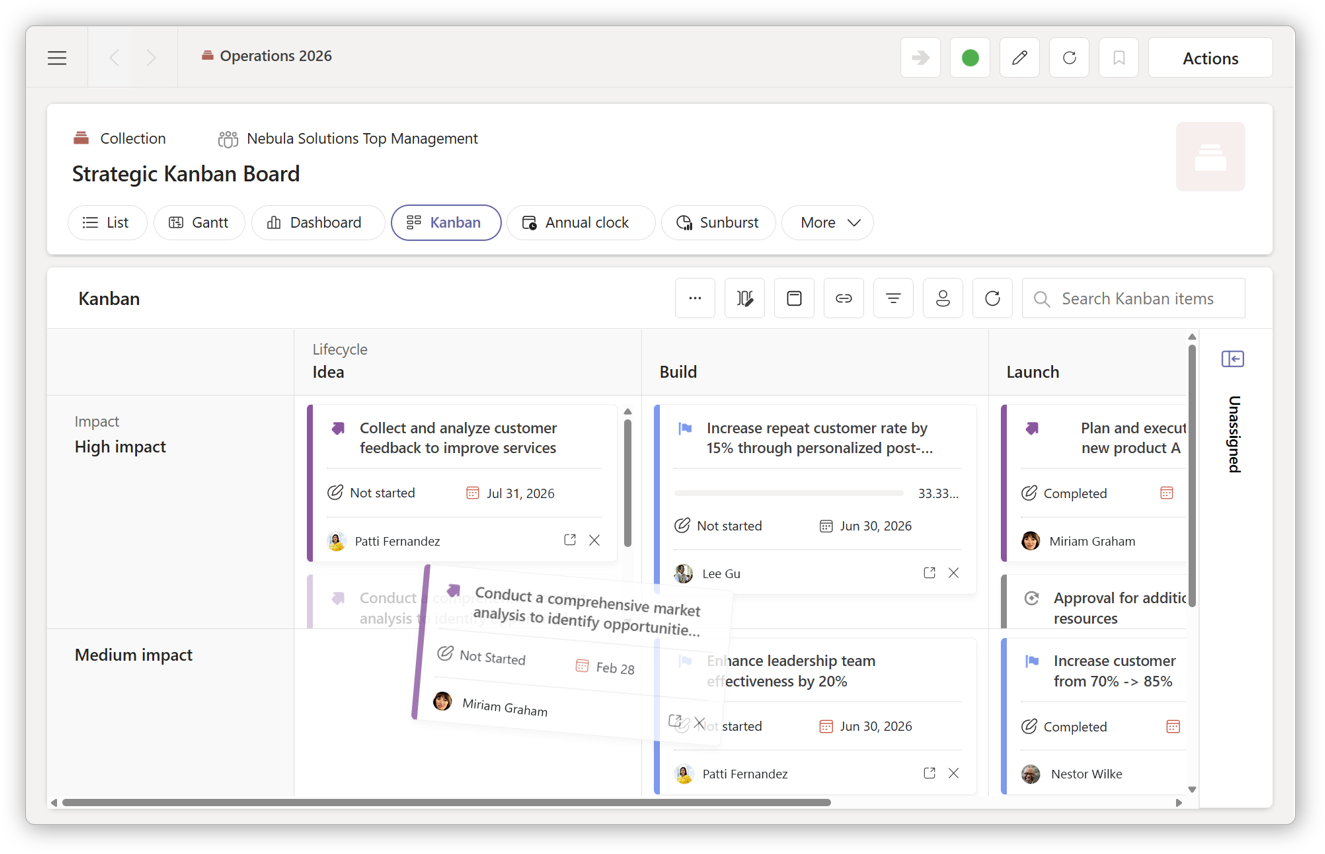
See flow, bottlenecks and stalled work across lifecycle phases or importance bands.
What depends on what?
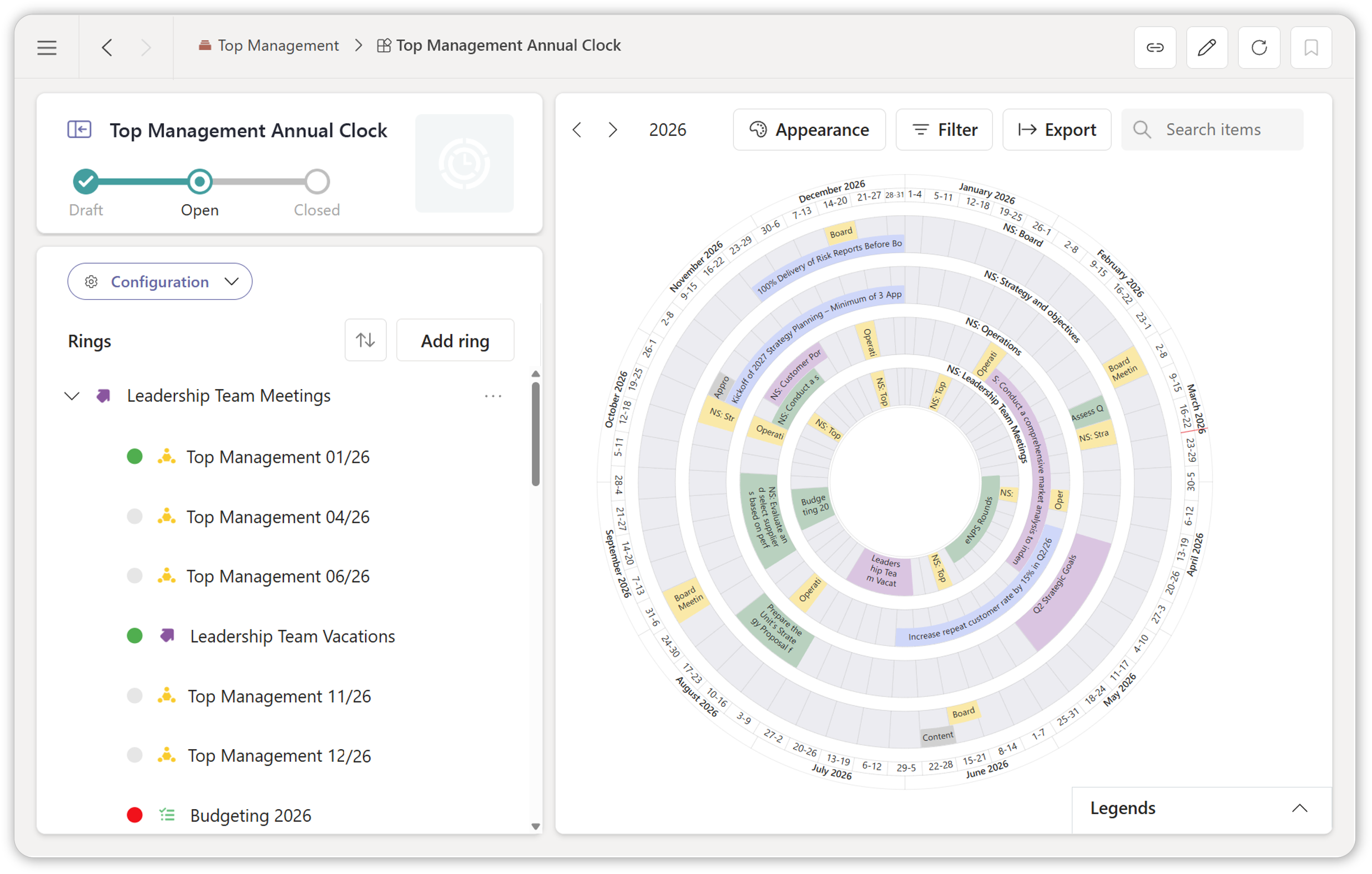
Use timelines, annual clocks and relationship views to understand sequencing, feasibility and systemic effects.
How Fingertip makes prioritization practical.
Strategic Views organize existing work so leaders can interpret, compare and act without creating new artifacts.
Views over real work
Strategic Views are lenses over tasks, plans, objectives, decisions, meetings and approvals that already exist in Fingertip.
Views need real objectives underneath
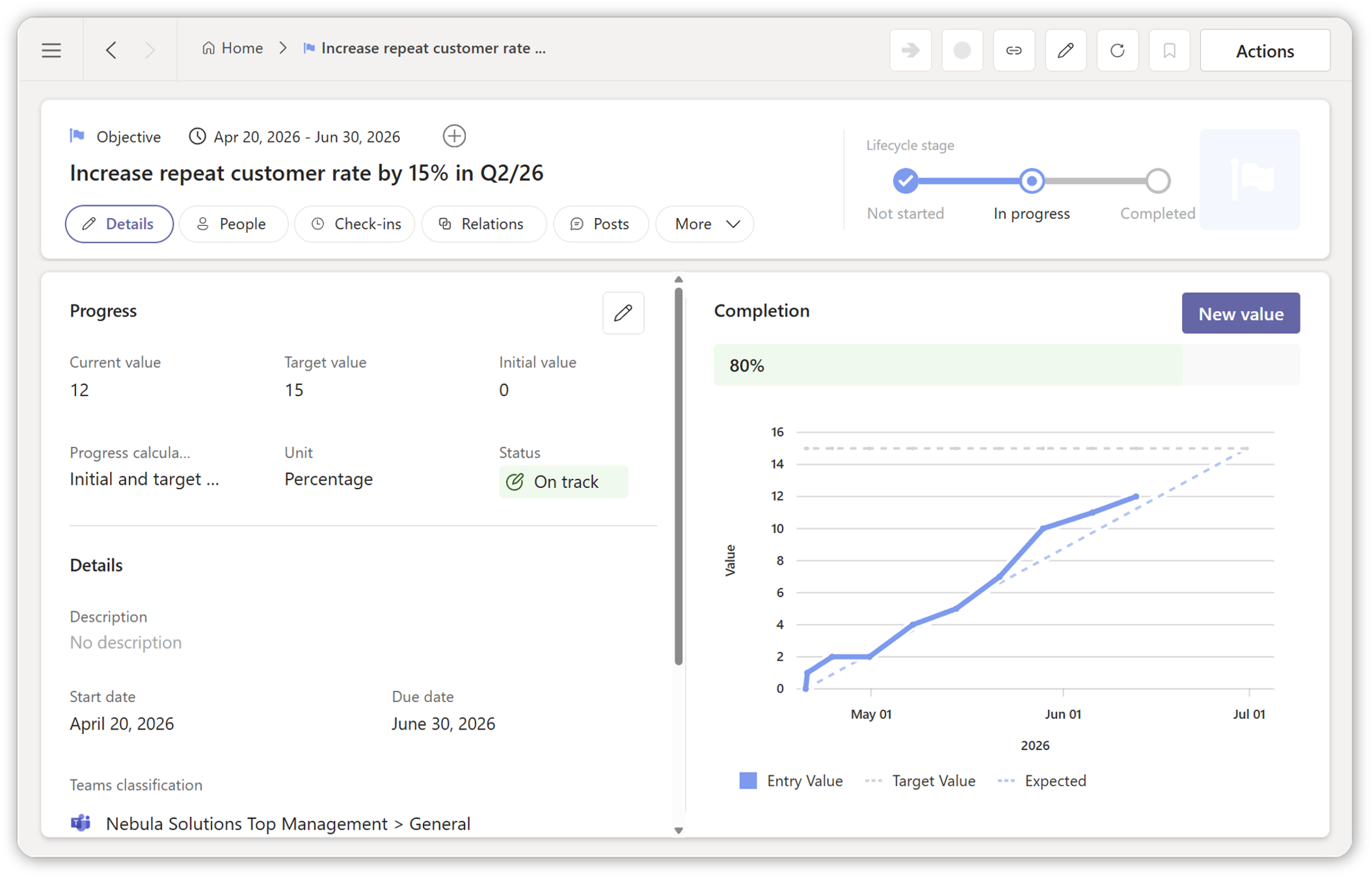
Strategic views become more valuable when they are grounded in objectives, ownership and progress signals instead of static reporting slides.
Connect views to objectives
Priorities need timing
Use the annual rhythm to understand when priorities collide, where leadership attention is needed and how commitments fit into the wider year.
Review the annual clock
See Strategic Views in action
Explore how Fingertip turns existing work into leadership views that support prioritization, trade-offs and early action.
From work to priorities.
Strategic Views follow the work as it evolves. Leaders use them repeatedly to interpret the situation, adjust focus and act earlier without creating new reports or parallel tracking.
Work in motion
Tasks, plans, objectives and decisions already exist across teams. Visibility starts from reality, not abstraction.
Strategic structuring
Work is organized through a chosen lens, such as a canvas, kanban board or timeline. Trade-offs become explicit.
Shared interpretation
Leaders discuss patterns instead of collecting updates. Less time on context, more time on decisions.
Early intervention
Focus and resources are adjusted while options still exist. Signals surface risk early.
Visibility changes the quality of leadership discussion.
The clearest proof is not more reporting. It is that leaders can see the situation, align faster and use time for choices instead of reconstruction.
“We now see the situation at a glance. It has brought real peace to leadership work.”
Leadership team member
Expert organization
“Priorities and progress are visible without extra reporting.”
Head of strategy
Logistics
“When priorities are visible, the discussion changes from status collection to leadership decisions.”
Leadership team member
Public sector
Most tools show activity. Strategic Views show what matters.
Fingertip helps leaders make prioritization visible, shared and grounded in work that is actually moving.
For leaders accountable for priorities.
Strategic Views matter most when leaders need to compare moving work, explain choices and adjust focus before problems escalate.
Portfolio-level clarity
See across teams and plans without collapsing complexity into status meetings or static reports.
Shared execution focus
Align teams on what matters now, what is blocked and what should move next.
Better decisions together
Discuss real work through a shared lens instead of reconstructing context from updates.
See what matters before it is too late.
If prioritization feels reactive today, Strategic Views can change that. See how Fingertip turns existing work into clear leadership signals inside Microsoft Teams.
Jaakko Pellosniemi
Founder, CEO

What leaders ask before using Strategic Views.
Straight answers about how Strategic Views help leaders prioritize real work without creating another reporting layer.
What are Strategic Views in Fingertip?
Strategic Views are Fingertip’s sensemaking and prioritization surfaces. They organize existing work such as tasks, plans, objectives, decisions, meetings and approvals into clear leadership views inside Microsoft Teams.
Do Strategic Views replace tasks or plans?
No. Strategic Views do not replace tasks, plans, objectives, meetings or decisions. They are views over existing work, designed to help leaders compare, prioritize and steer.
What kind of work items appear in Strategic Views?
Strategic Views can show Fingertip items such as tasks, plans, objectives, decisions, meetings and approvals as cards with ownership, lifecycle and progress signals.
How are priorities shown?
Priorities can be shown through lenses such as canvases, kanban boards, timelines, relationship views and other structures that make trade-offs, risk and progress easier to interpret.
Can Strategic Views be shared with teams?
Strategic Views are designed as shared leadership surfaces inside Microsoft Teams. They can support leadership reviews, plan steering and portfolio-level discussions.
Are Strategic Views updated automatically?
Strategic Views are grounded in existing Fingertip items and their live ownership, lifecycle and progress signals. They do not require a separate reporting layer or duplicate tracking.
Where do Strategic Views live in Microsoft Teams?
Strategic Views can be used as standalone leadership lenses or as context-aware views inside plans, depending on the leadership question and work context.
Do Strategic Views require extra reporting?
No. Strategic Views are built over real Fingertip work items. Their purpose is to support prioritization and early intervention without creating parallel reports.